16bit Histogram
 AACO
AACO ACR
ACR Auto IT8 Calibration
 Batch Scanning
 Clone-Tool
 ColorServer
 Descreening
 Expert Mode
 ExpressScan
 Focus Control
 Frame Detection
 GANE
GANE GCC
GCC HDRiRAW
 Help Videos
 Image Automatic
 Image to Web
 iSRD
iSRD JobManager
 JobMonitor
 Kodachrome Mode
 LAB Format
 Multi-Exposure
 Multi-Tasking
 Multiple Densitometer
 NegaFix
 Neutral Pipette
 Preview Concept
 PrinTao
 Printer Calibration
 SAC
SAC SC2G
SC2G SCC
SCC SRDx
SRDx USM
USM VLT
VLT WorkflowPilot

I have to say, for most shots I find the JPG scanning works fine. But having the RAW capability has helped me to recover a lot more of the image in old under- or overexposed slides and negatives – thank you.


SilverFast's HDRiRAW file format is the ideal archive format; it provides complete safety and flexibility to the user‘s non-destructive workflow.
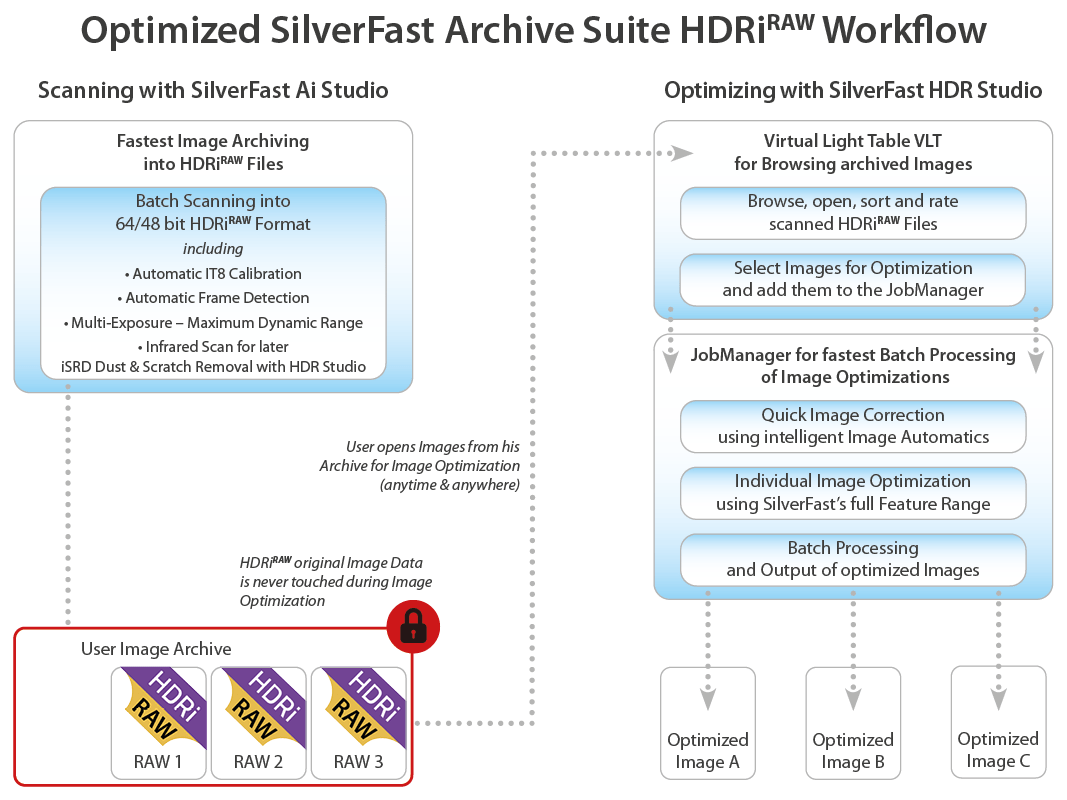
The HDRiRAW files can be considered as a kind of “RAW format from analog data”. In addition to the image data, color management information is included, where applicable also infrared data for dust and scratch removal and Negafix profiles for negatives. Optimized images are exported as TIFF files, while retaining the original image data. Following this way, various image optimizations can be made from the same starting point for comparison.
An HDRiRAW file cannot be right or wrong, good or bad – HDRiRAW is always perfect.
Using HDRiRAWW you will always achieve an optimal basis for your image optimization – no matter whether you are professional or beginner.
With HDRiRAW you receive image data, comparable to RAW data from analog originals.
HDRiRAW is particularly suitable for quickly building up a large digital archive, but also as a good basis for the processing of individual images. You will always receive the best quality base data possible without having to be a specialist in scanning or digital imaging.

If you scan photos, slides and negative film always into the HDRiRAW format, you are always on the safe side. Your analog originals are protected against loss and destruction, once you have digital copies including all capturable image data lying on your hard disk. Based on these data, which remain unchanged, you can perform image optimizations for various applications using SilverFast HDR (Studio).
If you already have created hundreds or thousands of HDR(i) files with a previous SilverFast version, you may easily convert these and all other digital images into the HDRiRAW format using SilverFast HDR (Studio). Your digital originals will be protected and the optimized and processed images are exported as copies.
The listed scanners are tested to support the HDRiRAW feature.
Braun Phototechnik
Canon
Epson
LaserSoft Imaging
Mediax
Microtek
Minolta
Nikon
Pacific Image Electronics
Plustek
Quatographic
Reflecta
Sanwa
I have to say, for most shots I find the JPG scanning works fine. But having the RAW capability has helped me to recover a lot more of the image in old under- or overexposed slides and negatives – thank you.

With 64-bit HDRi, I can quickly scan the film, and hand off further processing (including dust & scratch removal using iSRD) to SilverFast HDR Studio. The perfomance gains of iSRD over Digital ICE are impressive …

Using the SilverFast 64-bit HDRi feature, digital images of slides and negatives suitable for archiving can be achieved without any expert knowledge. … Tip: Save money by purchasing scanner and image editing software as a bundle.
SilverFast captures this information into a 64bit color HDRi file or a 32bit greyscale HDRi file.
This method is a true revolution in terms of optimizing scanner RAW data. All you need to modify your RAW data is SilverFast HDR, which can be purchased in our online shop. In case you do not yet have a SilverFast scanner software package, we recommend the SilverFast Archive Suite. This package includes every tool needed for a perfect HDRi workflow
The HDRi feature needs information from the infrared channel of the scanner, so please make sure your scanner supports HDRi. A copy of SilverFast HDR or HDR Studio is required for processing HDRi files.