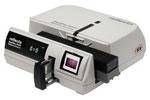
- 35mm small picture slide film scanner
- Optical resolution: 10.000 dpi (theoretical)
- Color depth: 48 bits
- Special feature: scans magazines up to 100 images
The German company PIE has been developing film and slide scanners of convincing quality for many years. PIE continues to provide up-to-date devices for the scanner market, and as the direct successor of the PowerSlide 5000 the PIE PowerSlide X magazine scanner is the latest model in the PowerSlide series. The automatic feed from slide magazines with capacities of up to 100 slides (CS, Universal, LKM and Paximat) significantly facilitates the scanning of large stocks of small picture slides.
With the introduction of the PowerSlide scanner, PIE has presented the very first scanner that can scan directly from the magazine. This allows to scan large image archives automatically and with high quality within a very short time. An ideal assistance for this task are the SilverFast image automatics, which ensure a smooth scanning process. In addition, there are further important features such as the patented SilverFast Multi-Exposure®, which increases the Dynamic Range of the scanner from 2.8 (631 grayscales) to 3.75 (5,623 grayscales). More information on how the Dynamic Range affects image quality can be found here.
We recommend the SilverFast Archive Suite for running the PowerSlide X. Using the batch scan mode you can automatically save whole magazines to HDRi RAW data format, Multi-Exposure can optionally be activated. The data of the infrared channel for dust and scratch removal with iSRD can also be written to this RAW data files.

SilverFast ADF Scan
ADF is an abbreviation for “Automatic Document Feeder“. The PowerSlide X film scanner is able to feed in small format slides automatically. This means, the user does not have to transport the filmholder from image to image by hand, but controls the feeder with SilverFast. This manual describes how to use the SilverFast ADF functionality.