 English [change]
 English
 Deutsch
 Français
 Italiano
 日本語
日本語 Español
 Português
 Russian
 Chinese (Simp.)
 Czech
Czech Polish (Store only)
The Dynamic Range of all scanners becomes significantly enhanced using SilverFast's Multi-Sampling with Auto-Alignment feature! SilverFast is the award-winning high-end scan software from LaserSoft Imaging from Kiel, Germany, the place where scanners have been invented. SilverFast has become famous through its world-wide bundles with scanner manufacturers such as Epson, Umax, Microtek and others. Now a new invention from LaserSoft Imaging called Multi-Sampling with Auto-Alignment enhances a quality limiting factor in scanners: Noise from CCD-Elements.
SilverFast Ai STUDIO and SilverFast SE Plus supply the most dramatic boost in quality to scanners with SilverFast's patent pending Multi-Sampling with Auto-Alignment.
What differentiates a very expensive high-end scanner, such as drum- or Linotype-Hell or Scitex Flatbed scanner, is the low noise of these scanners due to cooling of CCD and other constructive methods. When a scanner has very low CCD-noise so much more Unsharp Masking can be applied. That is the main reason that high-end scanners deliver very sharp and brilliant scans.
With multiple sampling turned on, SilverFast will perform either 4, 8, or even 16 scans during scan time. You can specify the count, usually the more the better. After performing the scans, the single images are averaged together into one image. Since noise is random, a special averaging procedure will cancel only the noise but leave the image details untouched. There is a problem associated with this process: Every scan might not exactly be in the same position with reference to each other, so normal averaging would blur the resultant Multisampling scan. That is why LaserSoft Imaging had to develop an intelligent auto-alignment, so no blurring effect can occur.
More info on the mechanics of Multi-Sampling can be found here: http://www.silverfast.com/show/silverfast-multisampling/en.html
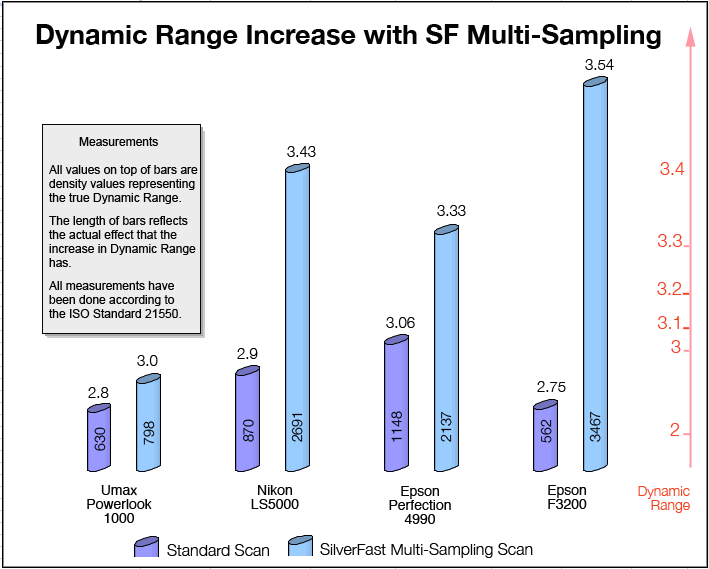
Dynamic Range Increase with SilverFast Multi-Sampling
We have measured the Dynamic Range increase according to the new upcoming ISO standard ISO 21550 and as you can see in the diagram below, SilverFast's Multi-Sampling yields dramatic improvement for scanner Dynamic Range. It is interesting to see that even for scanners that already have Multi-Sampling built into their hardware such as the Nikon LS5000, there is a significant increase in Dynamic Range from 2.9 to 3.4. That exemplifies the unique quality of SilverFast's Multi-Sampling process.
 Benefits of SilverFast's Noise Reduction and Dynamic Range Increase
- Clearer Shadows
- More Shadow Details
- Less Image Artefacts
- Much Sharper and Crispier scans as much more Unsharp Masking can be applied
- Better Quality even with enlargements beyond optical scanner resolution will produce better quality
What is DMAX, Dynamic Range and Density?
Image density is measured from image brightness with optical densiometers, and ranges from 0 to 4, where 0 is pure white and 4 is very black. More density is less brightness. Density is measured on a logarithmic scale. Density of 3.0 is 10 times greater intensity than a density of 2.0. An intensity range of 100:1 is a density of 2.0, and 1000:1 is a density of 3.0. Density 4.0 (which is 10.000:1) is not a theoretical maximum, the math is not limited, but it is a practical maximum of density, because almost nothing you can scan will reach 4.0.
The minimum and maximum values of density capable of being captured by a specific scanner are called DMin and DMax. If the scanner's DMin were 0.2 and DMax were 3.1, its Dynamic Range would be 2.9. DMax implies unique image tone values are distinguishable, and not hidden by electronic noise. Greater dynamic range can detect greater image detail in dark shadow areas of the photographic image, because the range is extended at the black end.
DMAX is a value describing how much light variations an input device can differentiate. In general manufacturers publish a value that does not relate to the true usable maximum dynamic range, instead it is a theoretical value. When a scanner can still see light variations such as in the shadows of a scan but the CCD already produces visible noise rendering the scan unusable. So briefly speaking DMAX is the maximum density a scanner can detect, while Dynamic Range is the usable range of shades a scanner can differentiate.
Facit: SilverFast's Multi-Sampling is one of the most sigificant and important features that has been integrated into scan software since scan software started to control the quality of scanners. Customers will surely appreciate the benefits and additional features they will get with SilverFast SE Plus, the entry level version of SilverFast and SilverFast Ai STUDIO the high-end version. More information can be found on LaserSoft Imaging's website:
Info and demo SilverFast SE PLUS
Info and demo SilverFast Ai STUDIO
(Source: IT-Enquirer)