 English [change]
 English
 Deutsch
 Français
 Italiano
 日本語
日本語 Español
 Português
 Russian
 Chinese (Simp.)
 Czech
Czech Polish (Store only)
|
Objectives of Color Management A professional workflow without color management is not conceivable any more today. To save time and money it is desired to see the result of the final scan on the monitor or printer already on the preview window before scanning. However, since every input- and output-device has its own color characteristics, one cannot assume without hesitation that the colors are the same as the original's after several processing steps. |
 (Please click to enlarge)
|
|
|
Color Management in SilverFast SE / SE Plus For our entry-level version of SilverFast SE, we want it to be as easy as possible for the users to apply a proper color management. Therefore, we have reduced the functionality to the very essentials. The internal color space is independent from any connected device, but it is also defined by a profile. This sets a basis for the color management system. SilverFast SE contains appropriate profiles for the associated scanner. |
 (Please click to enlarge) |
|
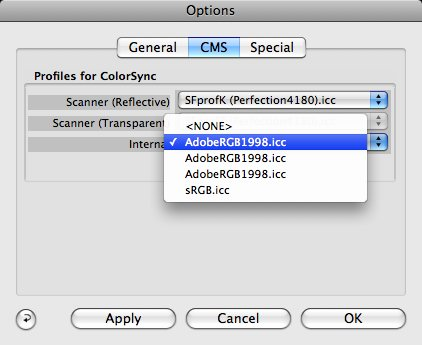 (Please click to enlarge) |
Options in the Color Management dialog
|
|
|
SilverFast SE / SE Plus Color Management System (CMS)
|
 |
 |
 |
 |
||
SilverFast Highlights
 | JobMonitor NEW! JobManager iPhone App  |
 | Multi-Exposure improved! Increased Dynamic Range |
 | AutoFrame Alignment improved! Rotate your images automatically to be horizontally aligned. |
 | Kodachrome NEW! Kodachromes without Blue Cast |
 | Printer Calibration NEW! Optional Feature |
 | HDRi NEW! HDR + infrared data |
 | Auto IT8 Calibration improved! Color calibrate your Scanner |
 | USM improved! Unsharp Masking |
 | IFF+Engine NEW! Optimized Frame Detection |
| more highlights | |