




















|
|
||||||
|
SilverFast Archive Suite
LaserSoft Imaging® presents a unique solution for fast and easy archiving of slides, negatives and reflective originals. With the new SilverFast Archive Suite you get a bundle of two programs: SilverFast Ai IT8 Studio and SilverFast HDR Studio. Since both programs are equipped with optimum functions, you will enjoy maximum processing speed as well as an efficient workflow. An integrated color management system that meets professional standards completes the convincing package.
|
|
||||
|
The SilverFast Archive Suite consists of the two programs: SilverFast Ai IT8 Studio and SilverFast HDR Studio
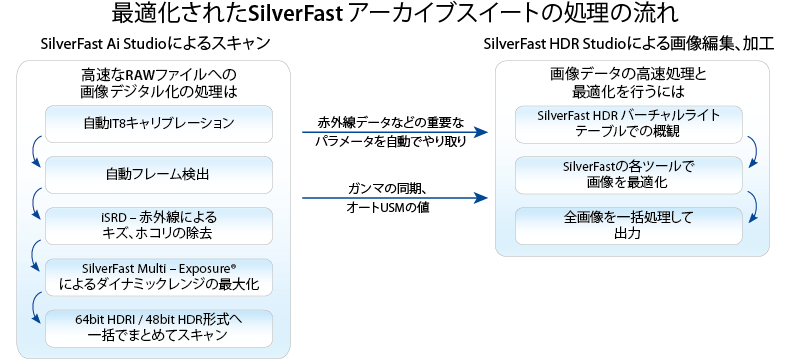
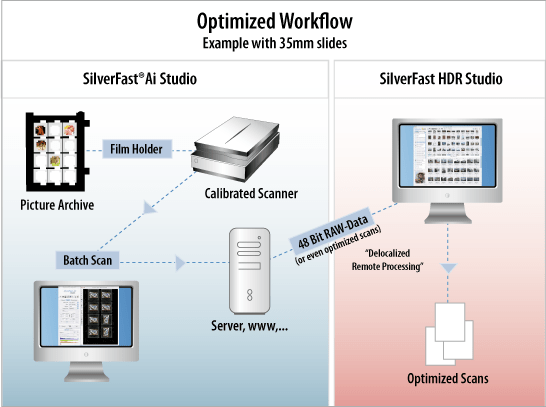
Using the scanner software SilverFast Ai IT8 Studio, you create 64bit/ 48bit RAW data for subsequent processing in SilverFast HDR Studio. These RAW files contain all the data of your images and are therefore ideally suited for further optimization and processing. The Archive Suite featuring full SilverFast functionality is ideal for professional use.
The SilverFast HDRi RAW data format with infrared channel
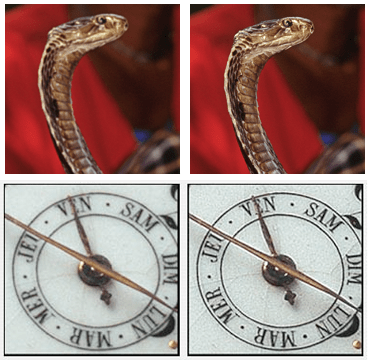
The HDRi feature is part of any SilverFast HDR and Archive Suite edition version 6.6.1 or later. Therefore, the 64bit HDRi color files (and the 32bit grayscale files, respectively) developed contain all readable image information, including the information of the infrared channel, the data from which can be used for image optimization (e.g. dust and scratch removal). Hence, HDRi RAW data is the perfect source material for any later post- processing steps. HDR(i) Workflow - (1) IT8 Scanner Calibration
Consistent colors and color management have been and are still in many areas a certain mystery for professionals and even more so for consumers. For some time achieving color consistent scans has been a field dedicated to professional color consultants and operators only. The new SilverFast version assists professionals and enables consumers to benefit from consistent colors without the need to bother with the sophisticated process behind it. With SilverFast, users of all experience levels can achieve color consistent scans by initially calibrating their scanners.
HDR(i) Workflow - (2) Scanning with SilverFast Ai IT8 Studio
Using the intelligent frame-finding option and the fast saving of originals into lossless HDR(i) file formats (64bit/ 48bit RAW data) enables you to quickly digitize whole image collections. This way, you can effectively prevent your pictures from being destroyed or getting lost.
The combination of SilverFast's Multi-Exposure® and patented Auto IT8 Calibration provides the best quality and safety possible. Since calibration data gets embedded into the files, you don't need to calibrate again when opening and processing them with SilverFast HDR Studio afterwards. A permanent gamma value synchronization of the 64bit/ 48bit data secures predictable and consistent brightness and color reproduction between SilverFast Ai IT8 Studio and SilverFast HDR Studio. HDR(i) Workflow - (3) Optimizing with SilverFast HDR StudioNotes, Hot-Folder and « SilverFast Archive Suite SE » Beginner Version
For beginners and users who may only occasionally deal with image processing, it is also recommended to have a look at our lower-cost SilverFast Archive Suite SE, a version with slightly reduced functionality. Of course, the most important features are included and an intelligent Auto Adjust facilitates the process of image optimization. If you already own a SilverFast version, you get the Archive Suite SE for a particularly favorable price.
Automatic Hot-Folder system for effective image processing (optional)
The SilverFast Hot-Folder feature makes scaling, sharpening, color separation and optimization of image data a much easier task and is, furthermore, time-saving and effective. Regardless of what kind of images have to be post-processed, optimized or converted into other color spaces, these images can now be automatically processed with the Hot-Folder system, instead of requiring a time-consuming and tedious manual adjustment for every single image. By default the original files will be stored in a special archive folder (non-destructive), to preserve the precious originals. Notes: The Hot-Folder feature is available for the Archive Suite as a paid add-on and a suitable IT8 target is required for the IT8 calibration. SilverFast Multi-Exposure® (support list), iSRD® (support list) and Auto Frame Dectection for filmholders (support-list) are hardware dependent. Please check if your scanner supports those features. |
||||||
« The unusual beauty of this Archive Suite is its very efficient batch scan capability that includes the infrared iSRD data in a 64bit raw scanner file. »
David Brooks (Photographer and Senior Editor of Shutterbug Magazine)
|
||||||
|
|
|
|
|||||||||||||||||||||||


"... The 64-bit HDRi color files [...] contain all readable image information including the information of modern scanners’ infrared channels, using this data for image optimization, e.g. dust and scratch removal."
"LaserSoft Imaging succeeded to develop a software that allows the effective digitization of large image collections in record time."
Then when processed [...] the iSRD cleaning can be applied as part of the process to a finished image file."
David B. Brooks (08/2010)