 français [modifier]
 English
 Deutsch
 Français
 Italiano
 日本語
日本語 Español
 Português
 Russian
 Chinese (Simp.)
 Tchèque
 Polonais (seulement boutique)
SilverFast allows you to profile your scanner, and while the process is hard withy third-party software like MonacoProfiler or ProfileMaker Pro, it's actually very easy to do using the IT8-version of SilverFast.
Calibrating a scanner involves setting its Tone Response Curve (Gamma) right and have a good characterisation profile set up. This sounds very easy, but in reality it involves a trial and error approach that can easily cost you a day or more to go through. Admittedly, applications like GretagMacbeth's ProfileMaker Pro 5.0.x take lot of the pain away, but it remains a tedious process, especially when you are dealing with film scanners.
While you can profile a scanner using whichever colour profile target you like with GretagMacbeth's or X-Rite MonacoProfiler's solution - including the much touted Hutcheson targets - SilverFast makes the process absolutely fool proof and painless.
SilverFast's approach seems to be acceptable to Heidelberg scanner users, so its quality must meet stringent requirements. SilverFast's profiling system does not allow you to use Hutcheson targets, but LaserSoft Imaging prides itself of the narrow tolerances used in manufacturing their own IT8-targets.
On top of that, SilverFast's targets contain a barcode which makes it possible for the software to automatically find the right reference file. Anyone who has profiled a scanner before knows that there are thousands of reference files out there. Picking the right one can be an error-prone process.
Setting Colour Options
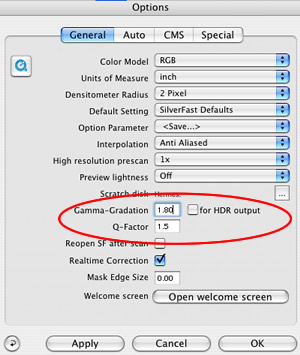
The only thing that SilverFast's profiling system does not automate, is setting the options correctly. That remains to be done by the scanner operator. The options can be found under "Options" and include the setting of Gamma as well as a quality factor.
The process of profiling the scanner with SilverFast is a matter of minutes. It involves you poistioning the IT8-target and clicking the profiling button. SilverFast makes IT8 targets for reflective media on Fuji Professional Paper and transmissive targets on Kodak Ektachrome Professional and Fuji Provia.
(Source: IT-Enquirer)