Why was Selective Color Correction developed?
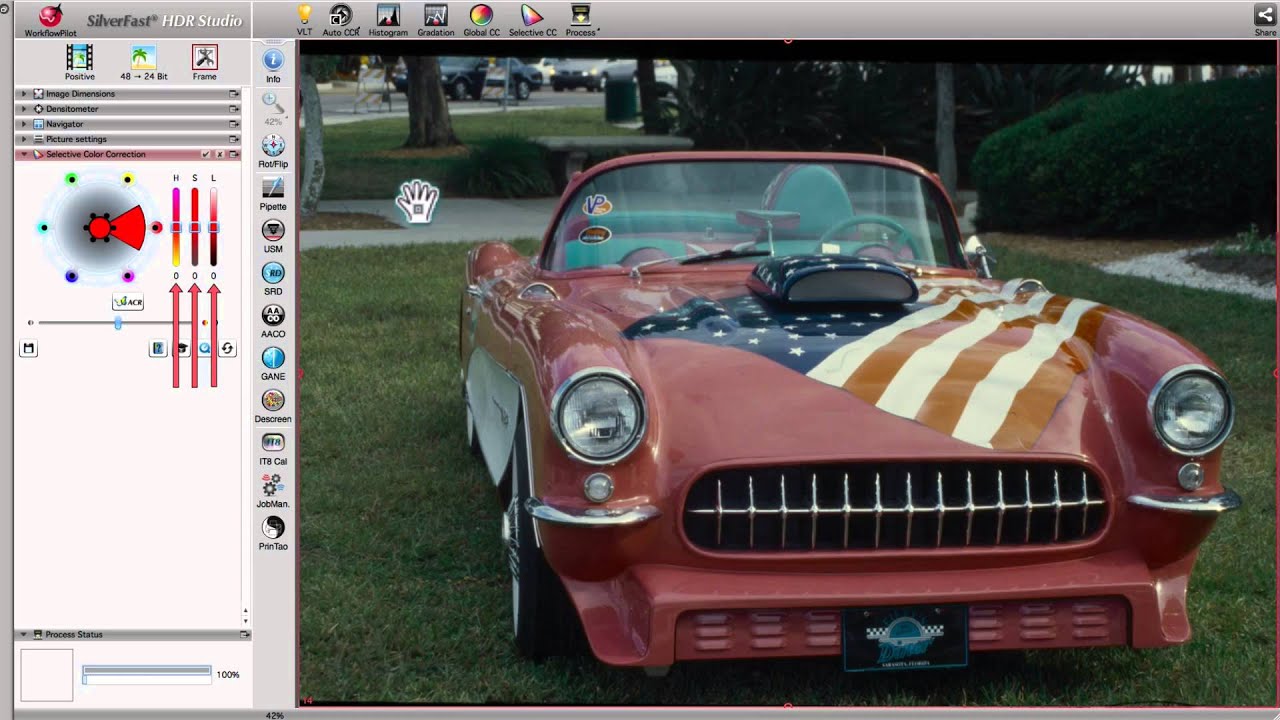
Selective Color Correction is an elementary component of reproduction technology and means that only one single color is selected and changed specifically; all other colors remain unaffected. The SCC tool enables selective color correction in a very simple manner. Just one click in the preview window easily selects the color to be changed – it is recognized immediately. From the original color, “warmer” or “cooler” color tones can be selected in a continuous way and their effects on the image evaluated in real time. With this free design option, individual color optimizations and improvements can conveniently be obtained to produce an image that suits the perceptions of the viewer.
How does Selective Color Correction work?
The secret of this tool lies in the immediate “recognition” of the selected color nuance and a practical palette composed of 6 or 12 base color variations that can be selected with continuous blending. The entire color palette is available. For more complicated cases, it is also possible to use scalable vector masks on freely defined areas. This permits up to 4 levels – independently from each other – to be subjected to complex color corrections of the same color with different color changes.


 16bit ヒストグラム
 AACO
AACO ACR
ACR Descreening
 ExpressScan
 GANE
GANE GCC
GCC HDRiRAW
 Image to Web
 iSRD
iSRD JobManager
 JobMonitor
 LAB Format
 Multi-Exposure
 NegaFix
 PrinTao
 SAC
SAC SC2G
SC2G SCC
SCC SRDx
SRDx USM
USM VLT
VLT WorkflowPilot
 エキスパートモード
 カラーサーバー
 クローンツール
 コダクロームモード
 ニュートラルピペット
 バッチスキャン
 フォーカスコントロール
 フレーム検索
 プリンターキャリブレーション
 プレビューコンセプト
 ヘルプビデオ
 マルチタスキング
 多重デンシトメーター
 自動画像最適化
 自動IT8 キャリブレーション