 español [change]
 English
 Deutsch
 Français
 Italiano
 日本語
日本語 Español
 Português
 Russian
 Chinese (Simp.)
 Checo
Checo Polaco (solo tienda)
Software profesional para escáneres CanonLa gama de productos de Canon consiste principalmente en escáneres de mesa para escanear originales reflectantes. Algunos escáneres disponen de una unidad adicional de transparencia que permite también escanear negativos, diapositivas y películas. La calidad de algunos modelos es realmente impresionante y adecuada para competir con escáneres específicos de diapositivas y películas. Simplemente usando SilverFast Multi-Exposure, los dispositivos como el CanoScan 9000F y CanoScan 9000F Mark II pueden obtener un rango dinámico entre 3.6 y 3.9. Esto significa que el hardware está disponible para capturar más de 9.500 sombras diferentes de gris. SilverFast está incluido en numerosos paquetes junto con escáneres Canon, convirtiendo estos escáneres en dispositivos profesionales que dan lugar a escaneos de alta calidad. Si va a adquirir un nuevo escáner Canon, le recomendamos que se asegure de que SilverFast está incluido con el dispositivo. Desde el prescaneo, la optimización, hasta la salida digital, usted se beneficiará de las funciones y características de SilverFast. Si todavía no tiene una copia de SilverFast para su dispositivo CanoScan, claro que puede conseguirla ahora misma. |
    |
SilverFast 8 vs Canon Scanner UtilityEste video explica los beneficios del software para escáneres SilverFast 8 comparado con el software Scanner Utility (ScanGear) de Canon usándolo con el CanoScan 9000F Mark II. |
|
Selección del EscanerElija su modelo de Canon para obtener información específica. Descargue demos y actualizaciones, compruebe compatibilidad y precios. 5600F | 8600F | 8800F | 9000F | 9000F Mark II | 9900F | 9950F | FS4000US |

PelículasNuestras películas le presentarán todas las funciones y ventajas de SilverFast, de manera rápida y fácil de entender. Abajo puede elegir directamente algunas películas que muestran las funciones más importantes de SilverFast. ______________________ [leer más …] Canon Ai Studio Features | Multi-Exposure | iSRD | Kodachrome | WorkflowPilot |

HerramientasGracias a sus funciones únicas, SilverFast se ha convertido en un estándar mundial de software para escáneres. La mayoría de estas funciones han sido patentadas y protegidas por la Ley de marcas. ______________________ [leer más …] Multi-Exposure | WorkflowPilot | Multi-Tasking | Auto calibrage IT8 |

Prensa y OpinionesPeriódicos y Revistas internacionales han probado SilverFast y están encantados con los resultados. Lea aquí lo que los editores y clientes piensan sobre SilverFast. Algunos de los artículos son análisis específicos de Canon. ______________________ [leer más …] Clientes sobre SilverFast y Canon | Shutterbug (9000F) |

Asistencia y ForoPara cualquier pregunta o problema, por favor diríjase a la página de asistencia para una gran variedad de enlaces útiles como nuestro foro Canon, las preguntas más frecuentes y los requisitos del sistema. ______________________ [leer más …] Foro flatbed scanners | Foro film scanners | Requisitos del Sistema |
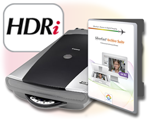
64Bit HDRi y Archive SuiteEl formato de 64bit HDRi de SilverFast contiene toda la información legible de la imagen así como los datos del canal de infrarrojos. Para un trabajo perfecto con HDRi, recomendamos SilverFast Archive Suite para su escáner Canon. ______________________ [leer más …] Película 64bit HDR | Archive Suite | Film Archive Suite |
SilverFast vs. Canon ScanGearCada fabricante de escáneres proporciona su propio software para sus dispositivos. Normalmente, estos programas no son tan potentes como SilverFast. Por ello, lo comparamos por usted. Los resultados del test están disponibles abajo. Revista Nadir | Rango Dinámico | Velocidad | Eliminación de Polvo y Arañazos |
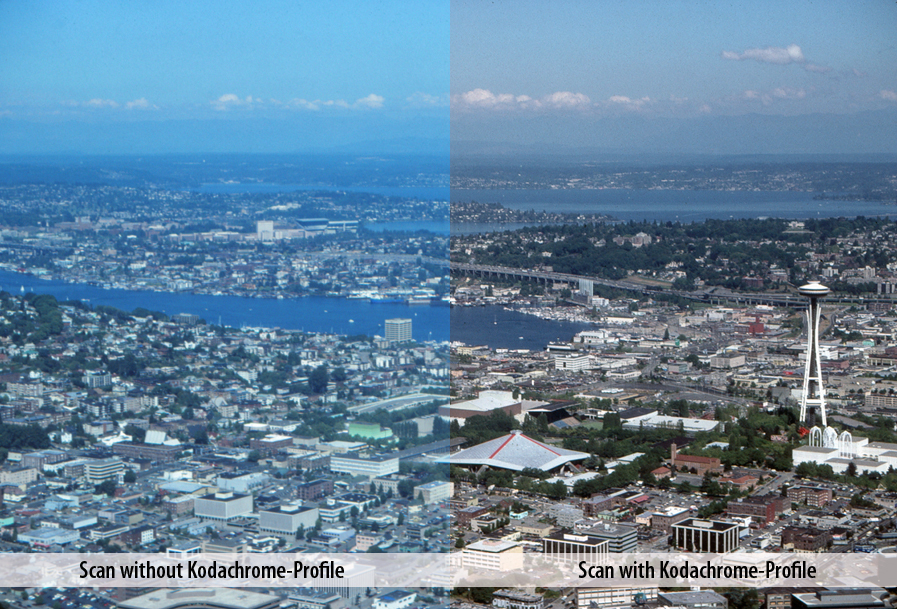
Kodachrome y CanonLas diapositivas Kodachrome son particularmente difíciles de escanear, estos escaneos a menudo muestran una dominancia azul. Utilizando un escáner Canon con SilverFast obtendrá escaneados perfectos. Información perfiles Kodachrome | Página Flash Kodachrome |

Resultados de escaneo óptimos para imágenes brillantes
|
||||||||||||||
|
|
||||||||||||||

 SilverFast 9 es compatible
 Ahora con los nuevos perfiles especiales SilverFast Kodachrome para escaners Canon disfruta usted tres ventajas significantes sobre el software estándard de Canon:

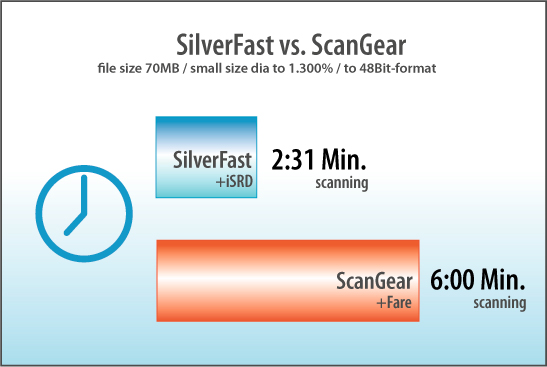
 El nuevo SilverFast acelera su escáner Canon. Reduzca el tiempo efectivo de digitalización hasta en un 60% (Comparación entre Canon ScanGear y SilverFast, ver la table). Esto gracias a las últimas técnicas de programación en SilverFast, por ejemplo aplicando Multi-Threading (procesamiento paralelo) y optimización de codigo para tecnologías Duo y Multi procesador. Este enfoque asegura un uso más eficiente de la arquitectura de su computador.
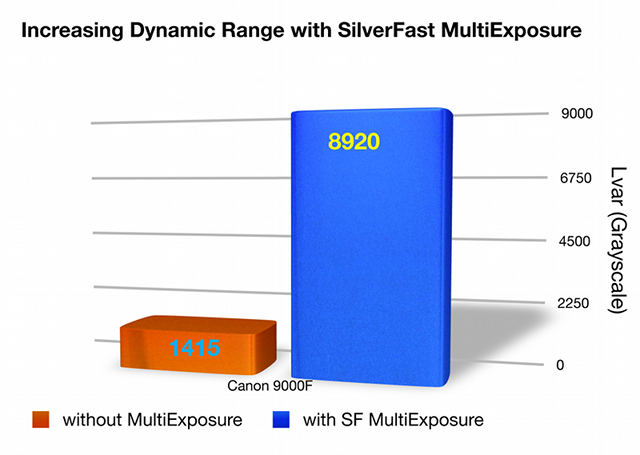
 El rango dinámico es el factor más importante para digitalizaciones de alta calidad. Es un hecho que un mayor rango dinámico asegura digitalizaciones signifacantemente mejores. Mejores digitalizaciones significa más detalles visibles en las luces y en las sombras como resultado de un rango dinámico más amplio. SilverFast Multi-Exposure® incrementa el rango dinámico del escáner Canon CanoScan 9000F de 3,15D (sin ME) a 3,95D (con ME). Este incremento demuestra que el escáner puede ver más niveles de grises, un incremento de 1.415 niveles a 8.920 niveles de grises (basado en ISO estandard 21550). Esa es una gran diferencia!
 Los usuarios de escáners Canon pueden esperar toda una diferencia con el nuevo iSRD en SilverFast 6.6.0r4. El nuevo iSRD es similar a Canon FARE, una tecnología infraroja de remoción de polvo y razguños. Pero iSRD es diferente a FARE. Además de una corrección automática, iSRD es completamente controlable en cuanto a la fuerza y efecto. La ventaja que tiene el usuario al controlar iSRD es que puede preservar detalles cruciales de la imágen que pueden sufrir deterioro con la tecnología más simplificada de Canon FARE. SilverFast iSRD también tiene un monitor de previsualización para controlar el efecto final de la corrección infraroja y así poder combinar iSRD con SRD. SRD es la única tecnología para remoción de polvo y razguños basada en software de SilverFast. SRD le permite al usuario añadir capaz (además de iSRD) con opción de enmascarar para manejar trabajos de remoción de polvo y arañazos más complejos y exigentes que no pueden ser resueltos solamente usando iSRD.