 français [modifier]
 English
 Deutsch
 Français
 Italiano
 日本語
日本語 Español
 Português
 Russian
 Chinese (Simp.)
 Tchèque
 Polonais (seulement boutique)
L'extension dune plage tonale réduite à 256 via une transformation de 8 bits uniquement engendre des vides dans l'échelle tonale - dû au manque de niveaux de gris. L'image perd en détails et en netteté. Cela peut également survenir quand l'algorithme de transformation de 10 à 8 bits n'est pas optimisé. Les vides dans l'histogramme (Fig. 2) que l'on nomme également « spikes » sont clairement visibles.
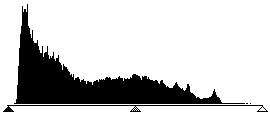
1. Histogramme sans étalement dans Photoshop
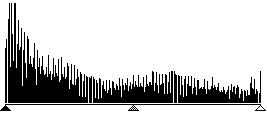
2. Histogramme avec étalement dans Photoshop
A travers une transformation optimisée de l'étalement des valeurs tonales avec les 10 ou 12 bits dans SilverFast Ai, le résultat final, soit le scan présente une répartition sans vide des niveaux de gris sur l'ensemble de l'échelle de gris (cf. Fig. 4). L'ajustage correct des ombres et des lumières, par exemple dont les valeurs sur le préscan deviennent trop blanches et dont certaines deviennent trop noires, joue un grand rôle sur la qualité. SilverFast Ai aide à localiser les points les plus clairs et les plus sombres de deux manières : Premièrement, le densitomètre peut être réglé sur CMJN% et indiquer, en se déplaçant sur le préscan, où se trouve le point le plus clair. Deuxièmement, une fonction permet en combinaison avec les outils Lumières/Ombres d'afficher le point le plus clair en pressant la touche « Ctrl » ou le point le plus sombre en pressant également la touche « Alt » par une croix rouge sur l'image prénumérisée. Cela permet de placer facilement les points finaux aux bons endroits dans SilverFast (Fig. 3).
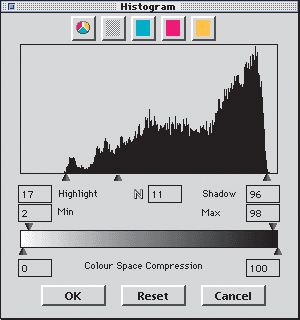
3. Histogramme dans SilverFast avec optimisation automatique
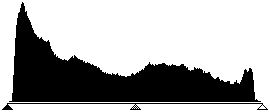
4. Histogramme après la numérisation avec SilverFast, avec 10 bits