Quick Links


Support-Werkzeug Kontakt

Sollte SilverFast sich nicht mehr öffnen lassen, können Sie uns über das folgende Support-Werkzeug kontaktieren. Dieses hat den Vorteil, dass uns automatisch Ihre SilverFast Supportdateien übermittelt werden.

Support-Werkzeug für OS X/macOS

Bitte führen Sie einen Doppelklick auf die DMG Datei aus, um diese zu mounten. Führen Sie anschließend das darin enthaltene "SilverFast Support-Tool" aus.

Support-Werkzeug für Windows

Bitte extrahieren Sie die Daten aus dem ZIP-Archiv. Führen Sie anschließend das darin enthaltene "SilverFast Support-Tool" aus.
 
Support-Assistent (FAQ)
The JobMonitor can not connect to my SilverFast Application

SymptomSymptom:
The JobMonitor does not show my SilverFast application in its detection window.


ProblemProblem:
The JobMonitor can not access the SilverFast JobMonitor Server application.

LösungLösung:
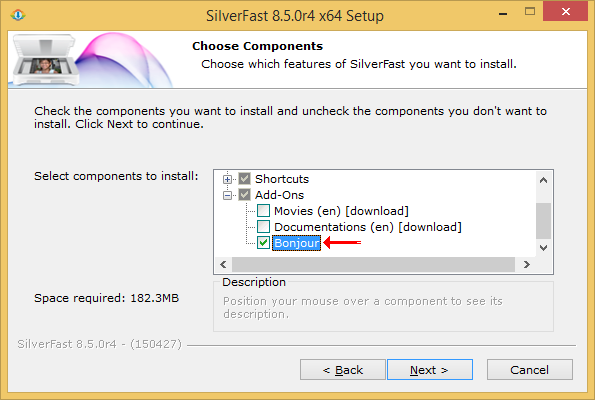
The JobMonitor requires Apple Bonjour to be installed on your computer. Installing Apple Bonjour is either possible through an iTunes installation or from the SilverFast installer itself. If you have not yet installed it, execute the latest SilverFast update again and select it under Add-Ons.


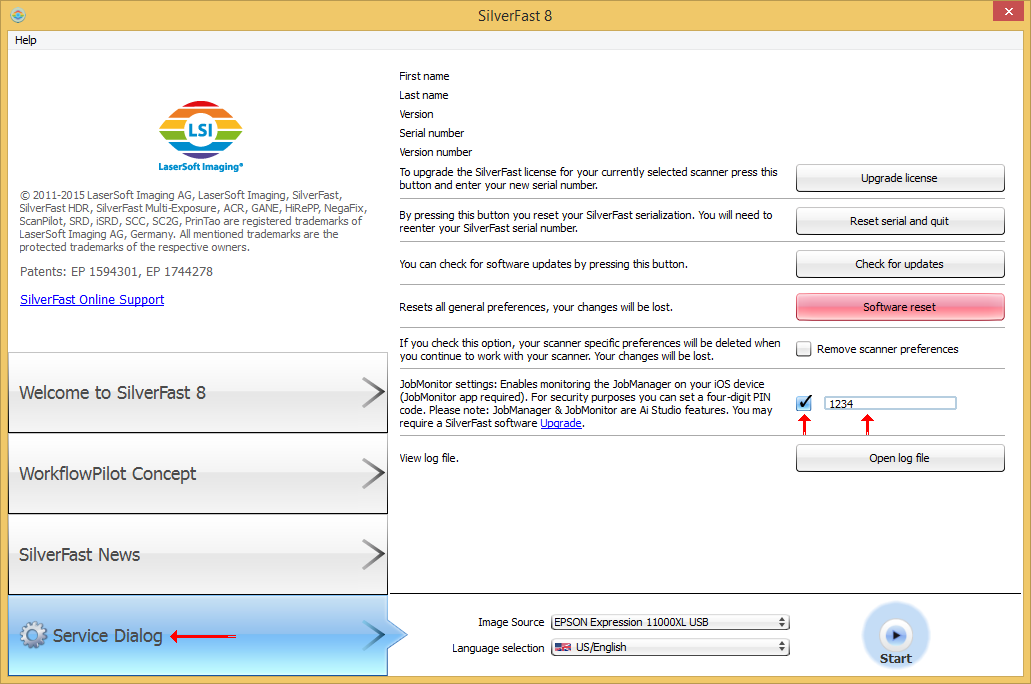
Make sure the JobManager is activated. Activating the JobMonitor is done in the welcome screen's Service Dialog. Here you can also set a code to prevent unauthorised access to your system. 


Make sure the local network connection is working properly. In case you are using several separate networks, make sure that both your iOS device and the computer running SilverFast are connected to the same network. Please contact your local network administrator in case you have any questions regarding the configuration of your devices.


Check the configuration of your system's firewall. Make sure SilverFast is allowed to access the network. Sending push notifications will also require access to the internet. Push notifications will be sent, if your iOS device is no longer connected to your network or is in stand-by mode. However SilverFast and your iOS device must first connect via local network to use this feature.


Mein Problem ist nun gelöst. Mein Problem ist noch nicht gelöst.
Start Zurück