日本語 [言語選択]
 English
 Deutsch
 Français
 Italiano
 日本語
日本語 Español
 Português
 Russian
 Chinese (Simp.)
 チェコ語
チェコ語 Polish (Store only)
 Read testimonials and reviews here ...

SilverFast Multisampling(オートアライン付)でノイズを除去!
SilverFast SE Plus と SilverFast Ai Studio に搭載。
煩わしいノイズ?
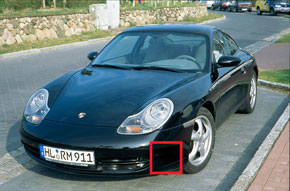
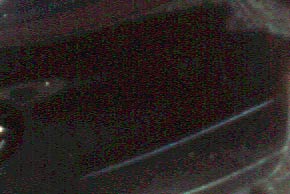
スキャナーのノイズはランダムなパターンとスキャンのかなり暗いエリアでよく目に付きます。ここではCCDが非常に小さなライトで動作しているため、イメージディテールからのシグナルとCCDや他のアナログ部品からのバックグラウンド・ノイズとの間の違いが小さすぎて、イメージノイズを発生させています。 もしイメージが一度だけ(標準スキャン)スキャンされる場合、ノイズはスキャン時につきます。 マルチのスキャニングの場合は、同じイメージがそれぞれ再スキャンされます。 従い、ノイズパターンはその都度ランダムに変化しますが、 SilverFast はそのノイズを差別化して、矛盾があればそれをキャンセルします。
 |
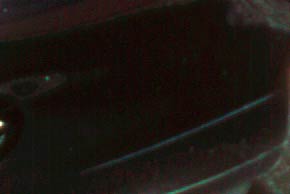 |
| ノイズがはっきり見える | ノイズが除去された後 |
動作について
 Multisampling 機能をオンにすると、
SilverFast は 4, 8, 16 回スキャンの何れかを実行します。
回数を指定する事ができ、回数を上げるごとに効果が上がります。
スキャン実行後、シングルの画像が平均化されて1つの画像になります。
ノイズはランダムですので、特殊な平均化処理によってノイズだけを消去して、画像ディテールは
そのまま残ります。
この処理手順に関連して1つ問題があります:各スキャンが正確に同じ位置にならず、平均化が結果として、Multisampling スキャンに
ブラーを発生させる恐れがあります。
Multisampling 機能をオンにすると、
SilverFast は 4, 8, 16 回スキャンの何れかを実行します。
回数を指定する事ができ、回数を上げるごとに効果が上がります。
スキャン実行後、シングルの画像が平均化されて1つの画像になります。
ノイズはランダムですので、特殊な平均化処理によってノイズだけを消去して、画像ディテールは
そのまま残ります。
この処理手順に関連して1つ問題があります:各スキャンが正確に同じ位置にならず、平均化が結果として、Multisampling スキャンに
ブラーを発生させる恐れがあります。LaserSoft Imaging はインテリジェントなオートアライン(整合)機能を開発せねばならなかったので、従って ブラー効果が起こる事はありません。