italiano [change]
 English
 Deutsch
 Français
 Italiano
 日本語
日本語 Español
 Português
 Russian
 Chinese (Simp.)
 Ceco
Ceco Polish (Store only)
 Read testimonials and reviews here ...

Liberatevi del rumore! Ora c'è il Multi-Sampling di SilverFast con Auto-Allineamento delle immagini.
E' una funzione inclusa in SilverFast SE Plus e SilverFast Ai Studio
Stanchi del rumore?
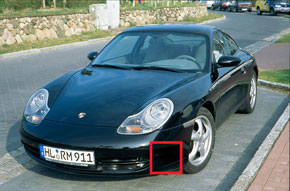
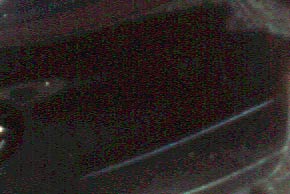
Il rumore prodotto dagli scanner è di natura casuale ed è visibile maggiormente nelle aree scure. Questo si verifica quando il CCD dello scanner ha poca luce con cui lavorare, e dunque la differenza tra il segnale (l'immagine da scandire) ed il rumore di fondo (generato dal CCD e da altre componenti analogiche) è troppo piccola; è questo a generare il rumore. Se l'immagine, come normalmente avviene, è scandita una sola volta, il rumore sarà probabilmente molto visibile. Ma grazie al Multi-Sampling, l'immagine viene scandita più volte; e poiché il rumore ha natura casuale, SilverFast è in grado di individuare che cosa è rumore all'interno dell'area scandita, e quindi rimuoverlo.
 |
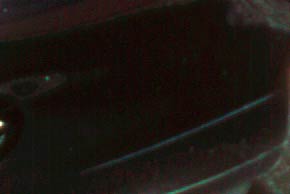 |
| Il rumore di scansione è chiaramente visibile | Il rumore di scansione è stato rimosso |
Come funziona?
 Quando il Multi-Sampling è abilitato, SilverFast effettua 4, 8 o anche 16 scansioni; è l'utente a decidere il numero (di solito, più sono meglio è).
Dopo le scansioni, viene creata una singola immagine dall'analisi di tutte le scansioni effettuate, e grazie alla sua natura casuale il rumore è localizzato e rimosso, senza pregiudicare i dettagli dell'immagine.
Esiste un problema intrinseco a questa modalità di lavoro, e cioè che si verifichino delle differenze di posizione nelle varie scansioni; ciò produrrebbe un'immagine finale poco nitida. Questo ha portato LaserSoft Imaging a sviluppare una funzione intelligente di auto-allineamento, in modo da annullare il rischio di ottenere immagini non nitide.
Quando il Multi-Sampling è abilitato, SilverFast effettua 4, 8 o anche 16 scansioni; è l'utente a decidere il numero (di solito, più sono meglio è).
Dopo le scansioni, viene creata una singola immagine dall'analisi di tutte le scansioni effettuate, e grazie alla sua natura casuale il rumore è localizzato e rimosso, senza pregiudicare i dettagli dell'immagine.
Esiste un problema intrinseco a questa modalità di lavoro, e cioè che si verifichino delle differenze di posizione nelle varie scansioni; ciò produrrebbe un'immagine finale poco nitida. Questo ha portato LaserSoft Imaging a sviluppare una funzione intelligente di auto-allineamento, in modo da annullare il rischio di ottenere immagini non nitide.