 Chinese (Simp.) [change]
 English
 Deutsch
 Français
 Italiano
 日本語
日本語 Español
 Português
 Russian
 Chinese (Simp.)
 捷克文
捷克文 Polish (Store only)
Calibrating a digital photo camera is always a pain. You have to make sure the lighting is evenly distributed across the test target, which almost by definition excludes calibrating or profiling a camera outdoors. SilverFast DC Pro with calibration target does not take away that pain point, but it makes the rest of the process easy and inexpensive.
Normally, profiling your digital camera means you have to own software like Eye-One Match or ProfileMaker Pro, or MonacoProfiler. But SilverFast DC Pro comes in a version with a profiling target. The target is not as complete as GretagMacbeth's DigitalChecker SG, but it costs almost nothing and allows you at least to set the white balance correctly for your camera.
How do you profile your digital camera in SilverFast DC Pro? You start by taking an evenly lighted photo of the target. Any digital camera target should be evenly lighted, and this step is probably the most difficult in the whole profiling/calibrating process. The best is to take photo inside, with the target facing a window or catching light from two or three light sources with about the same intensity. These lights should be directed towards the target, much the same like what a studio photographer would do in his/her studio setup.
The target should then be photographed with the photographer standing right in front of it. You can position it upright on a table or even on the floor, as long as the target's sides are more or less straight when photographed.
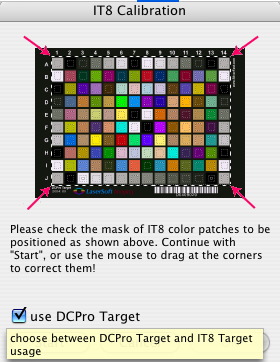
By clicking OK, you will give SilverFast the instruction to actually create the camera profile. You will have to use this profile for photographs taken under the same conditions as the target was. This means that you will have to set your white balance, ISO setting and every other setting on your camera to the same values as when you shot the target. Only yhen will the colours be correct, and the profile useful.
(Source: IT-Enquirer)