 English [change]
 English
 Deutsch
 Français
 Italiano
 日本語
日本語 Español
 Português
 Russian
 Chinese (Simp.)
 Czech
Czech Polish (Store only)
 A new era of batch proces- sing has begun with the new
 The new SilverFast 6.5 now makes imaging even easier! The extensive selection of editing tools has been enhanced with several new features, allowing users to produce optimum quality images with ease.
IT8-Calibration has become a fully automated process with SilverFast V6.5.0r6. The new Auto Frame Detection automatically creates frames for all images in the prescan. Multi-Exposure (Please check if your scanner is supported!) increases the hardware's capability to capture the full dynamic range, bringing out extensive image detail in both highlights and shadows. This is high dynamic range at its best!
The improvement of NegaFix automatically reduces colorcasts when scanning negatives. New NegaFix Profiles allow for more detailed corrections. The reliable Selective Color Correction SCC now enables users to create, save and export presets for use in other SilverFast versions.
The new SilverFast Ai-HDR Gamma Optimization further synchronizes 48bit scanning between SilverFast Ai / Ai Studio and image editing with SilverFast HDR / HDR Studio. The HDR / HDR Studio independently adopts the gamma settings of your previous scan.
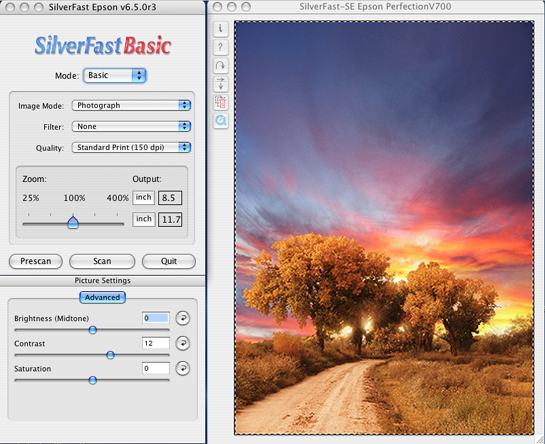
The SilverFast Basic provides a simplified user interface, giving beginners an easier start in the software. In basic mode, users become familiar with the essential features of the software while being presented with only minimum editing tools. Once a comfortable level is attained, users can then switch to standard mode, where the full functionality and powerful features are then available to experience all that SilverFast has to offer.
SilverFast 6.5 has been optimized for the following operating systems:
Mac OS-X 10.3 and higher, Windows 2000, XP. Mac OS9, Mac OSX 10.2 and lower and Win98 (SE/ME) will be no longer supported.
You can upgrade to SilverFast 6.5 for a nominal fee:
- for SilverFast Ai, DC Pro and HDR: from 40,-Euro/US$,
- for SilverFast AI Studio, DC Pro Studio and HDR Studio: from 50,-Euro/US$ without Multi-Exposure.


