 English [change]
 English
 Deutsch
 Français
 Italiano
 日本語
日本語 Español
 Português
 Russian
 Chinese (Simp.)
 Czech
Czech Polish (Store only)
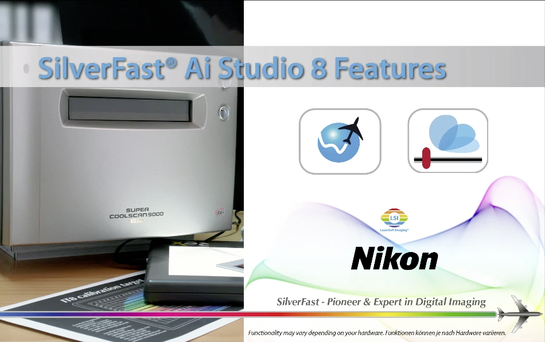
Professional Scanner Software for Nikon ScannersFilm scanners of the Nikon CoolScan brand belong to the most popular and quality devices for scanning negatives and slides. Nikon has cancelled the support for its own scanner software, versions for the actual operating systems aren't existing. SilverFast is an alternative and an enhancement, that introduces a lot of new and valuable features for Nikon scanners. |
    |
Scanner SelectionSelect your Nikon model to obtain scanner-specific information. Download demos and updates, check compatibility and prices. LS 9000 | LS 8000 | LS 5000 | LS 4000 | LS 2000 | LS 1000 | LS 50 | LS 40 |

MoviesOur movies will introduce all SilverFast highlights and advantages to you, quick and easy to understand. Below you can directly select some movies showing the most important SilverFast features. _____________________ [read more …] Nikon Ai Studio Features | Multi-Exposure | iSRD | Kodachrome | WorkflowPilot |

HighlightsThanks to its unique features and highlights SilverFast has become world standard for scanner software. A majority of these features is patented and protected by trademark law. _____________________ [read more …] Multi-Exposure | WorkflowPilot | IT8 Calibration | Focus Control |

Press & TestimonialsInternational newspapers and magazines have tested SilverFast and are excited with the results. Read here what editors and customers think about SilverFast. Some of the articls are Nikon specific reviews. _____________________ [read more …] Customers about SilverFast & Nikon | Shelly Katz - Nikon & SilverFast |

Support & ForumFor questions or problems regarding SilverFast and Nikon scanners, please refer to the support overview page, which provides a variety of useful links, like our Nikon forum, the general FAQ and the current system requirements. _____________________ [read more …] Forum Nikon scanners | System Requirements |
64Bit HDRi & Archive SuiteSilverFast's 64bit HDRi format contains all readable image information along with the data of the infrared channel. For a perfect HDRi workflow, we recommend the SilverFast Archive Suite for your Nikon scanner. _____________________ [read more …] Movie 64bit HDRi | Archive Suite | Film Archive Suite |

SilverFast vs. Nikon ScanEvery scanner manufacturer provides an own scanner software for its devices. Usually, these software solutions are not as powerful as SilverFast. Therefore, we compare for you. Test results are available below. Nikon Scan & SilverFast | Dynamic Range | Dust and Scratch Removal |
Kodachrome & NikonKodachrome slides are particularly difficult to digitize, the scans often show a blue cast. Using a Nikon scanner with SilverFast, you obtain perfect scans. Even SRD and iSRD can be applied. Info Kodachrome Profiles | Kodachrome Flash page |

Optimum scan results for brilliant images
|
||||||||||||||||||||||||||||||
|
|
||||||||||||||||||||||||||||||

 SilverFast 9 supported

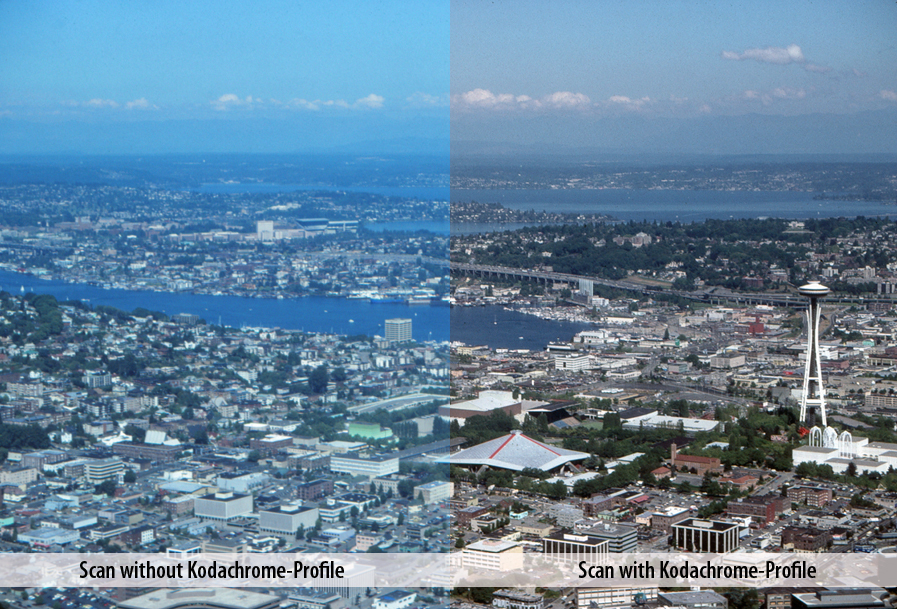
 Thanks to our special Kodachrome profiles for our Nikon software you have three major advantages compared to usual software that let you finally scan your Kodachrome slides in high quality: maximum Dynamic Range, IT8 calibration and free of dust and scratches.

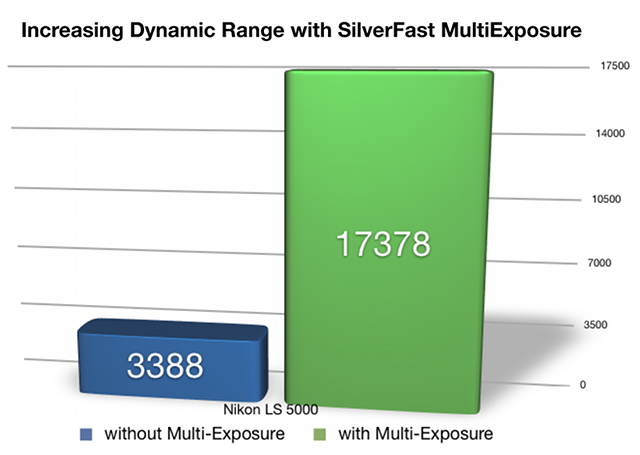
 Dynamic Range is the most important factor for high quality scans, and a higher Dynamic Range ensures significantly better scans. Better scans means more visible details in highlights and shadows as a result of higher Dynamic Range. SilverFast Multi-Exposure® increases the Dynamic Range of the Nikon Super CoolScan 5000 ED from 3.53D (without ME) to 4.24D (with ME). This increase shows that the scanner can see more levels of gray, an increase from 3.388 levels to 17.378 levels of gray (based on ISO Standard 21550*). That is a remarkable difference!
 Now with the new special SilverFast Kodachrome profiles for Nikon Scanner you can enjoy three significant advantages over the standard Nikon software:
Years ago while shooting for TIME Magazine I realized that great hardware companies don't necessarily make the best software - and as much as I loved my NIKON film scanners in the field, they just weren't producing the quality I expected and needed. Then I added SilverFast software into the workflow and the difference was remarkable.
I really don't know how this all works, I'm just a photographer, not a geek - but I do know that the great functions in the interface, ease of operation and an accuracy to interpret the original, produce better and faster scans than I ever had done before."
Shelly Katz