Polski [change]
 English
 Deutsch
 Français
 Italiano
 日本語
日本語 Español
 Português
 Russian
 Chinese (Simp.)
 Czech
Czech Polski (tylko sklep)
Thank you for purchasing a copy of SilverFast 8. If you have installed and tested a demo version prior to your purchase, it is not necessary to re-download or re-install SilverFast 8. You can easily activate your full version from the already installed demo version. Therefore, please keep at hand your SilverFast 8 serial, which was sent to you via email.
Activating a SilverFast 8 serial number
If your SilverFast software is a scanner software, please initially connect your scanner to your computer and turn your scanner on.
- Start your already installed SilverFast 8 demo version.
- On the welcome screen, click the button « Service Dialog » at the bottom left.
- In this service dialog, click the button « Upgrade license ».
- Enter « first and last name, which were used during the purchase ».
- Enter your SilverFast 8 serial number and click on « Unlock ».
- Exit the service dialog and click the « Start » button.
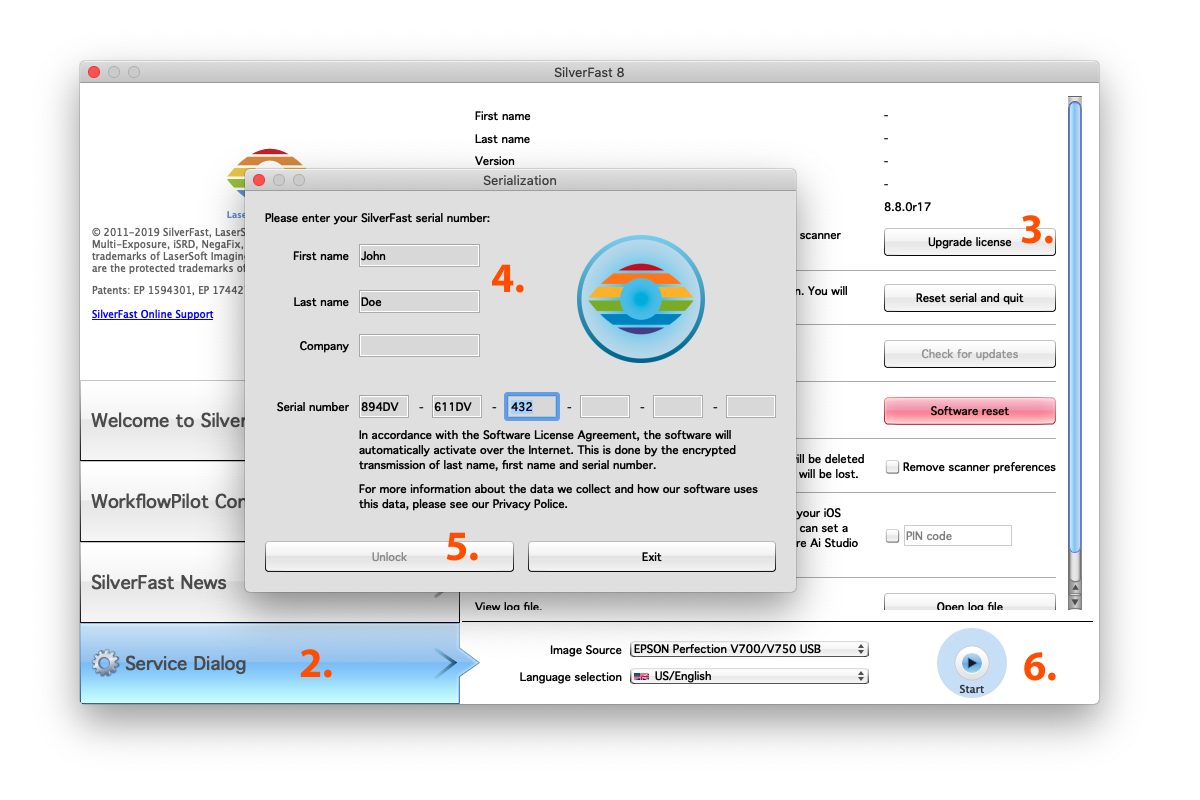
(please click to enlarge)
If you need help unlocking your copy of SilverFast or if you have any other question, please don't hesitate to get into contact with our support team.
Have fun using your new SilverFast 8 Version.