 español [change]
 English
 Deutsch
 Français
 Italiano
 日本語
日本語 Español
 Português
 Russian
 Chinese (Simp.)
 Checo
Checo Polaco (solo tienda)
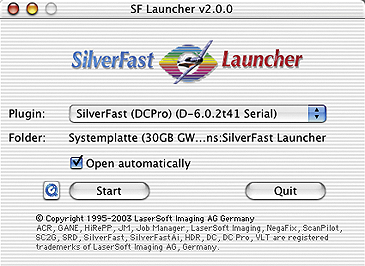
SilverFast Stand-Alone Application
SilverFast can now be operated by its own Stand-Alone application in addition to the existing Photoshop plug-in and Twain module. The advantage of the "SF Launcher" is the small memory requirement (only 2-4 MB) and the significantly faster loading of the application.
SilverFast now ships with SF Launcher, a small application that is capable of launching the SilverFast plug-in. It works as an alternative way of calling SilverFast if you don't need the full functions of Photoshop.
Using SF Launcher is easy:
- first open the the "SF Launcher" application.
- a selection box lists all installed SilverFast Photoshop plug-ins.
- select the plug-in of your choice and click the "Import" button... the chosen SilverFast plug-in will launch.
SF Launcher's choices refer to SilverFast plug-in(s) installed inside the SilverFast application folder. These plug-ins will be launched from the "SF Launcher" application.
The final scans will be saved directly to disk.


