 deutsch [ändern]
 English
 Deutsch
 Français
 Italiano
 日本語
日本語 Español
 Português
 Russian
 Chinese (Simp.)
 Tschechisch
 Polnisch (nur Shop)
Professionelle Scanner-Software für Epson-Scanner |
|
|
Die hochwertigen Geräte der Marke Epson entfalten ihr volles Potential durch den Einsatz von SilverFast. Viele Epson-Flachbettscanner eignen sich nicht nur zum Digitalisieren von Dokumenten und Fotos, sondern dank Transparent-Einheit auch zum Scannen von Dias, Negativen und Filmstreifen.
SilverFast gehört zum Lieferumfang vieler Epson-Scanner und verwandelt sie in Profi-Geräte, deren Scan-Ergebnisse sich wirklich sehen lassen können. Daher empfehlen wir Ihnen, bei der Anschaffung darauf zu achten, dass Sie einen Epson-Scanner mit SilverFast Scanner-Software kaufen. |
    |
Epson Scan vs SilverFast 8Dieses Video bringt Ihnen die Vorzüge der Scanner-Software SilverFast 8 gegenüber der Software Epson Scan in Verwendung mit den aktuellen Scannern von Epson näher. |
|
Spezial-Lösungen mit Epson-Scannern |
|
SilverFast Office Scanner: BehördenScannerIm Rahmen der SilverFast Office-Serie werden hochwertige Epson-Geräte mit einer speziellen SilverFast-Version ausgeliefert. Diese SilverFast Office-Produkte sind dank angepasster SilverFast-Software hochspezialisiert und erfüllen die Anforderungen der Bundesdruckerei zur Erstellung von Ausweispapieren im sogenannten DIGANT®-Verfahren (Digitales Antragsverfahren). Weitere Infos und die Möglichkeit zum Kauf finden Sie unter www.officescanner.de. |
SilverFast X-Ray: Scanner für den Bereich MedizinSilverFast X-Ray ist speziell für das Digitalisieren von Röntgenfilmen konzipiert worden. Dank einer individuellen Anpassung ist die Software in der Lage, das Maximum an Details sowie den gesamten Tonwertreichtum aus medizinischen und wissenschaftlichen Röntgenfilmen herauszuholen. Weitere Infos finden Sie hier: SilverFast X-Ray. |
Scanner-AuswahlWählen Sie Ihr Epson-Modell aus, um scanner-spezifische Informationen zu erhalten. Laden Sie Demos und Updates, prüfen Sie Kompatibilitäten und Preise. V600 | V700 | V750 | V800 | V850 | 2450 | 3200 | 4870 | 4990 | 10000XL | 11000XL | 12000XL |

MoviesUnsere Movies zeigen Ihnen schnell und leicht verständlich alle Highlights und Vorteile von SilverFast. Einige ausgewählte Movies zu ganz besonderen SilverFast-Features können Sie unten direkt anwählen. _________________ [erfahren Sie mehr …] Epson Ai Studio Features | Multi-Exposure | iSRD | Kodachrome | WorkflowPilot |

HighlightsEs sind die einzigartigen Features und Highlights, die SilverFast weltweit zum Standard für Scanner-Software werden ließen. Ein Großteil dieser Features ist patent- und markenrechtlich geschützt. _________________ [erfahren Sie mehr …] Multi-Exposure | WorkflowPilot | Multi-Tasking | IT8-Kalibrierung |

Presse & MeinungenInternationale Zeitschriften und Magazine haben SilverFast getestet und sind von den Ergebnissen begeistert. Lesen Sie, was Redakteure und Kunden über SilverFast denken. Einige der Artikel sind ganz spezifische Epson-Testberichte. _________________ [erfahren Sie mehr …] Kunden zu SilverFast & Epson | John Barclay - V700 | Mark Segal - V750 |

Support & ForumBei Fragen oder Problemen rund um SilverFast und Epson-Scanner, finden Sie in der Support-Übersicht eine Vielzahl von nützlichen Links, z.B. unser Epson-Forum, die allgemeinen FAQ und die aktuellen Systemanforderungen. _________________ [erfahren Sie mehr …] Forum Epson-Scanner | Systemanforderungen |
64Bit HDRi & Archive SuiteDas SilverFast 64Bit HDRi-Format enthält alle lesbaren Bildinformationen inkl. der Daten des Infrarotkanals. Für den perfekten HDRi-Workflow empfehlen wir zu Ihrem Epson-Scanner die SilverFast Archive Suite. _________________ [erfahren Sie mehr …] Movie 64Bit HDRi | Archive Suite | Film Archive Suite |

SilverFast vs. Epson ScanJeder Scanner-Hersteller liefert eine eigene Scan-Software mit seinen Geräten aus. Diese ist aber bei weitem nicht so leistungsfähig wie SilverFast. Deswegen vergleichen wir für Sie. Testergebnisse finden Sie eine Zeile weiter unten. Foto Hits V600 | Dynamik-Umfang | Staub- und Kratzerentfernung |
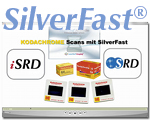
Kodachrome & EpsonKodachrome-Dias sind besonders schwierig zu digitalisieren; oft werden die Scans blaustichig. Mit einem Epson-Scanner und SilverFast gelingen Ihnen perfekte Scans und sogar SRD und iSRD können angewendet werden. Info Kodachrome-Profile | Kodachrome Flash-Seite |

Optimale Scan-Ergebnisse für brillante Bilder
« Ich habe gerade ein Upgrade zu SilverFast 8 für einen Epson-Scanner gekauft. Fantastisch! Es ist, als würde man zum günstigen Preis eines Upgrades einen komplett neuen Scanner bekommen. » Professor Roderick Robertson, Saint Mary's University
|
||||||||||||||||||||||||||||||||||||||||||
|
|
||||||||||||||||||||||||||||||||||||||||||

 SilverFast 9 unterstützt
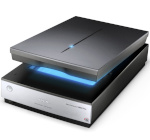
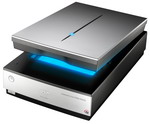
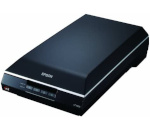
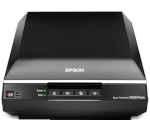
 Fotograf Mark Segal ist ein Experte, wenn es um Techniken zum Scannen geht. Kürzlich hat er ein Tutorial geschrieben mit dem Titel:
 Dank neuer spezieller Kodachrome-Profile für unsere Epson-Software genießen Sie gegenüber der
herkömmlichen Software drei entscheidende Vorteile, mit denen Sie ihre Kodachrome-Dias
endlich qualitativ hochwertig scannen können: maximaler Dynamikumfang, IT8-kalibriert und von Staub
und Kratzern befreit.
Dank neuer spezieller Kodachrome-Profile für unsere Epson-Software genießen Sie gegenüber der
herkömmlichen Software drei entscheidende Vorteile, mit denen Sie ihre Kodachrome-Dias
endlich qualitativ hochwertig scannen können: maximaler Dynamikumfang, IT8-kalibriert und von Staub
und Kratzern befreit.


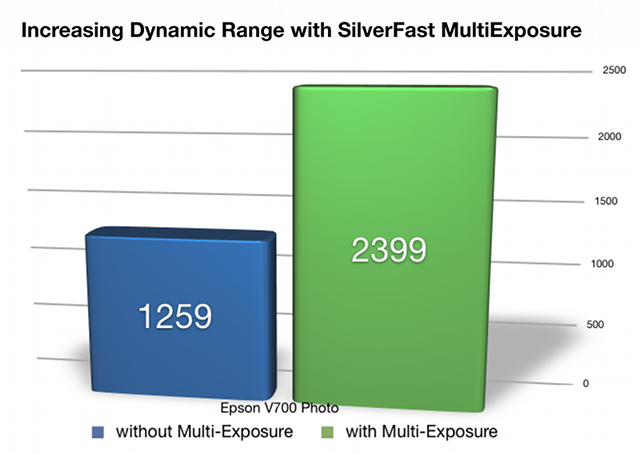
 Eine entscheidende Rolle für hohe Qualität beim Scannen spielt der Dynamikumfang; denn im Allgemeinen erzielt man mit einem größeren Dynamikumfang signifikant bessere Ergebnisse. Eine Software, die es dem Scanner ermöglicht, mehr Details in den Lichtern und den Schatten zu erfassen, erhöht damit wesentlich den Dynamikumfang der Hardware. Mit SilverFast Multi-Exposure erreicht zum Beispiel ein Epson V700 einen Dynamikumfang von 3,38D (ohne nur 3,10D). Somit steigert SilverFast Multi-Exposure die Anzahl der wahrnehmbaren Graustufen von 1.259 auf 2.399 (basierend auf der ISO Norm 21550*) Dies ist ein beachtlicher Unterschied!
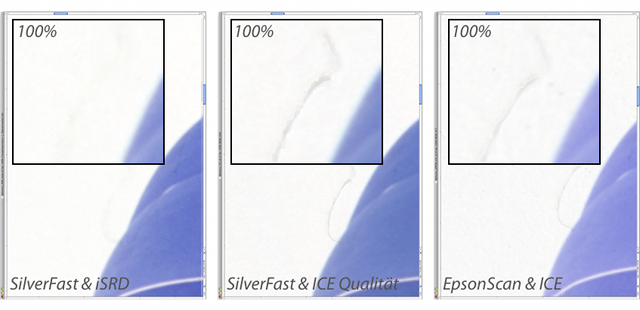
 Für Epson-Anwender wird sich ab SilverFast Version 6.6 durch das neue iSRD® einiges ändern. Das neue iSRD ist, ähnlich der ICE-Technologie, eine ebenfalls auf Infrarot-Technik beruhende Staub- und Kratzerentferung. Doch iSRD arbeitet anders als ICE. Zudem ist iSRD vom Anwender in der Wirkungsstärke anpassbar und kontrollierbar. Neben einer sicheren Vorschau auf das Endergebnis kann iSRD sogar noch mit SRD® kombiniert werden. SRD ist die Software basierte Variante der Staub- und Kratzer-Entfernung, die ohne Infrarot-Technik arbeitet. In SRD können (zusätzlich zu iSRD) drei weitere Retusche-Ebenen mit
individuellen Masken angelegt werden.
Für Epson-Anwender wird sich ab SilverFast Version 6.6 durch das neue iSRD® einiges ändern. Das neue iSRD ist, ähnlich der ICE-Technologie, eine ebenfalls auf Infrarot-Technik beruhende Staub- und Kratzerentferung. Doch iSRD arbeitet anders als ICE. Zudem ist iSRD vom Anwender in der Wirkungsstärke anpassbar und kontrollierbar. Neben einer sicheren Vorschau auf das Endergebnis kann iSRD sogar noch mit SRD® kombiniert werden. SRD ist die Software basierte Variante der Staub- und Kratzer-Entfernung, die ohne Infrarot-Technik arbeitet. In SRD können (zusätzlich zu iSRD) drei weitere Retusche-Ebenen mit
individuellen Masken angelegt werden.
John Barclay wurde kürzlich von seiner Schwester gefragt, ob er ihr einen Vorschlag machen könnte, wie sie am besten eine große Anzahl Familienbilder einscannen könnte. Dazu hat John die Archive Suite mit einem Epson V700 getestet und festgestellt:
"Wenn Sie einen einfachen, schnellen und effizienten Weg suchen, Ihre wertvollen Familienbilder, Dias und Negative zu archivieren, dann empfehle ich Ihnen ausdrücklich die SilverFast Archive Suite von LaserSoft Imaging."
Um Farb-Genauigkeit zu gewährleisten, hat John seinen Scanner zunächst mit der automatischen SilverFast IT8-Kalibrierung farb-kalibriert, da er ungerne viel Zeit in PhotoShop mit der Korrektur der Scans verbringt. Im zweiten Schritt testete John die Auto-Rahmen-Erkennung und die Batch-Scan-Option um mehrere Bilder gleichzeitig einzuscannen. "Was für eine Zeit-Ersparnis!"
John rät dringend dazu, im 48Bit HDR oder sogar im 64Bit HDRi Format zu scannen, um so viele Daten wie möglich zu erfassen. Ein weiteres SilverFast-Feature, das John für sehr erwähnenswert hält, ist Multi-Exposure, das die Anzahl der erfassbaren Graustufen (Details) erhöht und Bildrauschen reduziert. John war sehr zufrieden mit der SilverFast iSRD-Funktion zum Entfernen von Staub und Kratzern als "... ein sehr mächtiges Feature, so auschließlich enthalten in SilverFast-Produkten." Ebenfalls einen guten Eindruck hat NegaFix hinterlassen, eine Funktion, um Negative in Positive umzuwandeln.
(Klicken zum Vergrößern)
Den vollständigen Test-Bericht können Sie in John Barclays Blog lesen. (Englisch)
John Barclay