 português [modificar]
 English
 Deutsch
 Français
 Italiano
 日本語
日本語 Español
 Português
 Russian
 Chinese (Simp.)
 Tcheco
 Polish (Store only)
Professional Scanner Software for Canon ScannersCanon's product range predominantly consists of flatbed scanners for digitizing reflective originals. Some scanners feature an additional transparency unit, that allows to also digitize negatives, slides and filmstrips. The quality of some models is really impressive and suited to rival dedicated film and slide scanners. Just by using SilverFast Multi-Exposure®, devices like the CanoScan 9000F and CanoScan 9000F Mark II can achieve a Dynamic Range between 3.6 and 3.9. This means, the hardware is able to capture over 9.500 different shades of gray. SilverFast is included in many Canon scanner's package of delivery to turn these scanners into professional devices, that deliver high quality scans. If you are going to purchase a new Canon scanner, we recommend to assure SilverFast is included with the device. From prescan to optimization to digital output, you will benefit from SilverFast‘s features and highlights. If you don‘t own a copy of SilverFast for your CanoScan device yet, of course you can get it right now. |
    |
SilverFast 8 vs Canon Scanner UtilityThis video explains the benefits of scanner software SilverFast 8 compared to the Canon Scanner Utility (ScanGear) in use with the CanoScan 9000F Mark II. |
|
Scanner SelectionSelect your Canon model to obtain scanner-specific information. Download demos and updates, check compatibility and prices. 5600F | 8600F | 8800F | 9000F | 9000F Mark II | 9900F | 9950F | FS4000US |

MoviesOur movies will introduce all SilverFast highlights and advantages to you, quick and easy to understand. Below you can directly select some movies showing the most important SilverFast features. _____________________ [read more …] Canon Ai Studio Features | Multi-Exposure | iSRD | Kodachrome | WorkflowPilot |

HighlightsThanks to its unique features and highlights SilverFast has become world standard for scanner software. A majority of these features is patented and protected by trademark law. _____________________ [read more …] Multi-Exposure | WorkflowPilot | Multi-Tasking | IT8 Calibration |

Press & TestimonialsInternational newspapers and magazines have tested SilverFast and are excited with the results. Read here what editors and customers think about SilverFast. Some of the articls are Canon specific reviews. _____________________ [read more …] Customers about SilverFast & Canon | Shutterbug (9000F) |

Support & ForumFor questions or problems regarding SilverFast and Canon scanners, please refer to the support overview page, which provides a variety of useful links, like our Canon forum, the general FAQ and the current system requirements. _____________________ [read more …] Forum flatbed scanners | Forum film scanners | System Requirements |
64Bit HDRi & Archive SuiteSilverFast's 64bit HDRi format contains all readable image information along with the data of the infrared channel. For a perfect HDRi workflow, we recommend the SilverFast Archive Suite for your Canon scanner. _____________________ [read more …] Movie 64bit HDRi | Archive Suite | Film Archive Suite |
SilverFast vs. Canon ScanGearEvery scanner manufacturer provides an own scanner software for its devices. Usually, these software solutions are not as powerful as SilverFast. Therefore, we compare for you. Test results are available below. Nadir Magazin | Dynamic Range | Speed | Dust and Scratch Removal |
Kodachrome & CanonKodachrome slides are particularly difficult to digitize, the scans often show a blue cast. Using a Canon scanner with SilverFast, you obtain perfect scans. Even SRD and iSRD can be applied. Info Kodachrome Profiles | Kodachrome Flash page |

Optimum scan results for brilliant images
|
||||||||||||||
|
|
||||||||||||||

 SilverFast 9 suportado
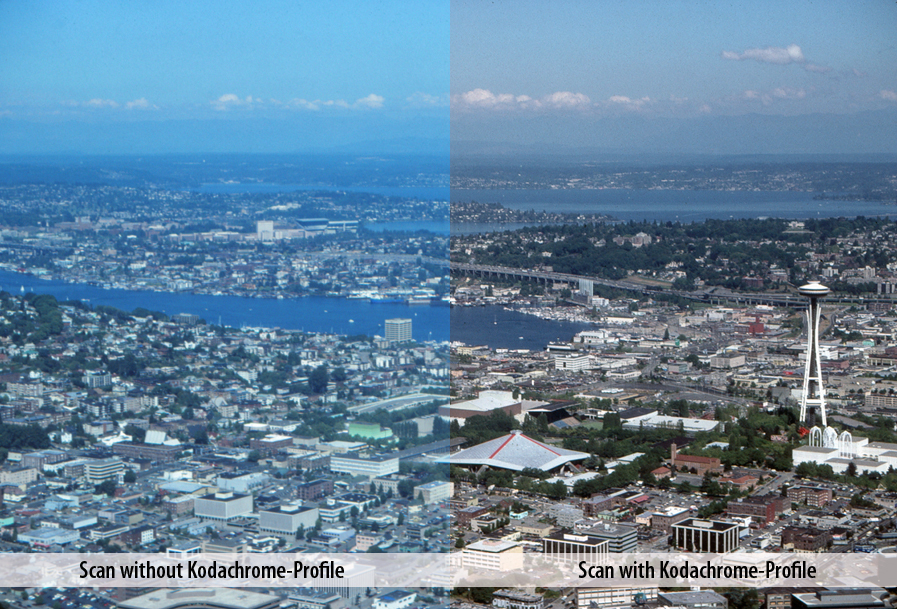
 Thanks to our special Kodachrome profiles for our Canon software you have three major advantages compared to usual software that let you finally scan your Kodachrome slides in high quality: maximum Dynamic Range, IT8 calibration and free of dust and scratches.

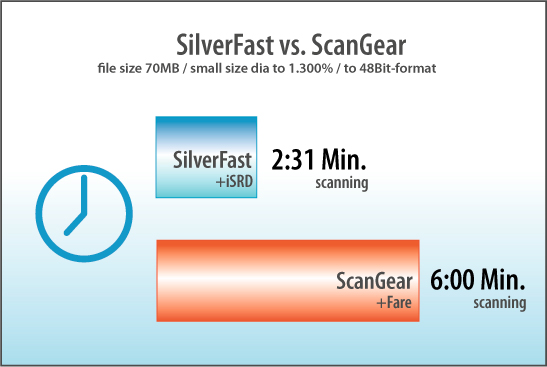
 SilverFast gives your Canon scanner a speed boost. Reduce the effective scan time by 60% (Comparison of Canon ScanGear and SilverFast - see Chart). This is achieved by using the latest programming techniques within SilverFast, i.e. applying Multi-Threading (parallel processing) and code optimization for Duo- and Multi-Core processor technologies. This approach ensures the most efficient use of your computer's architecture.
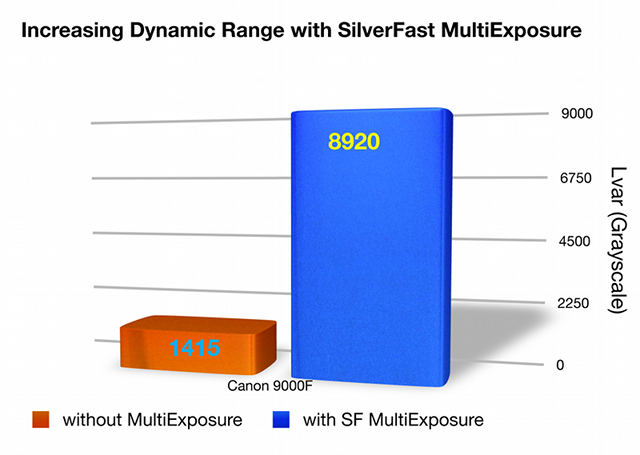
 Dynamic Range is the most important factor for high quality scans, and a higher dynamic range ensures significantly better scans. Better scans means more visible details in highlights and shadows as a result of higher dynamic range. SilverFast Multi-Exposure® increases the Dynamic Range of the Canon 9000F from 3.15D (without ME) to 3.95D (with ME). This increase shows that the scanner can see more levels of gray, an increase from 1.415 levels to 8.920 levels of gray (based on ISO Standard 21550*). That is a remarkable difference!
 Now with the new special SilverFast Kodachrome profiles for Canon Scanner you can enjoy three significant advantages over the standard Canon software: